Dealership management system

From first lead to the ledger, in one system

MSAR CAR is an Arabic-first system that brings customers, inventory, purchasing, sales and accounting together for car dealerships in Saudi Arabia.

  • Arabic RTL and English LTR
  • Per-company isolation in the database
  • A full audit trail
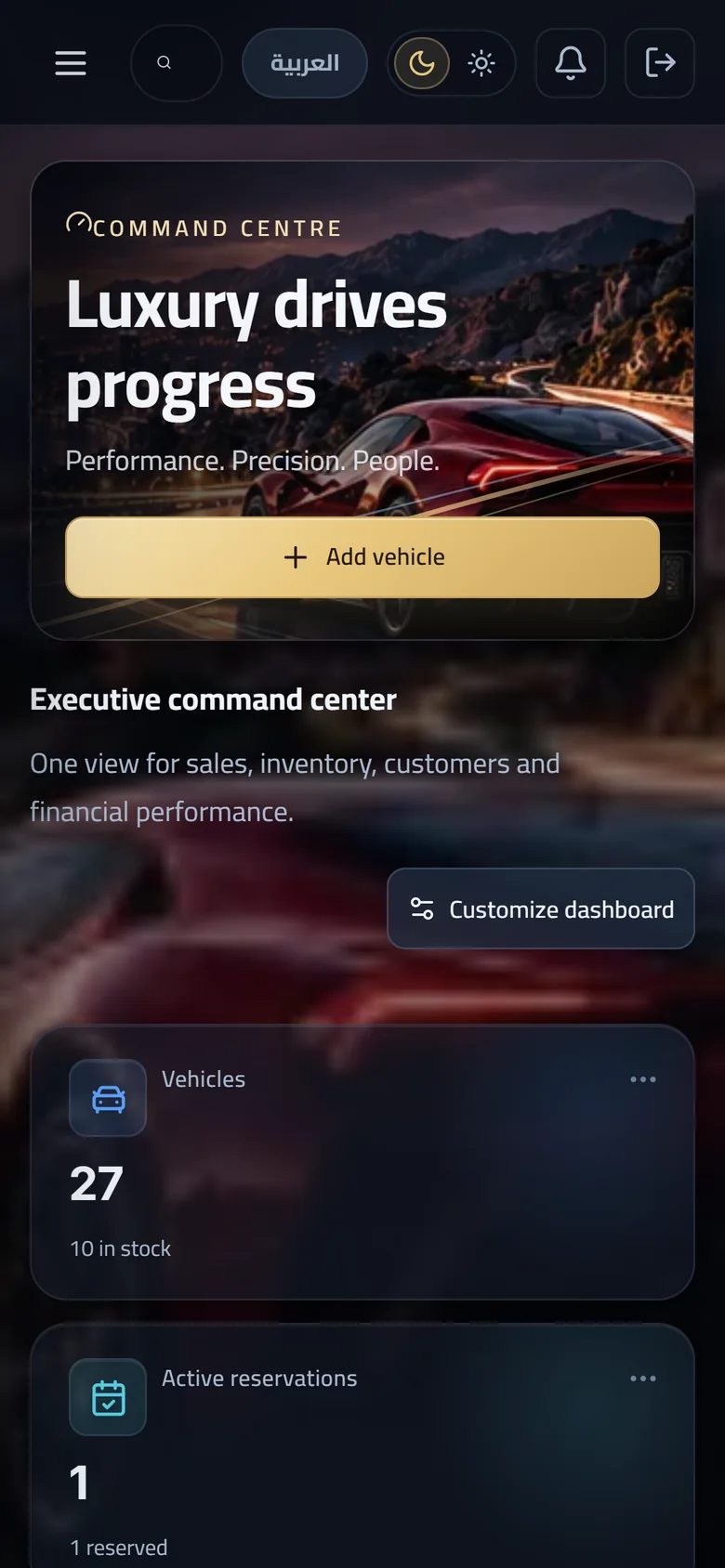
The dashboard on mobile in MSAR CAR

What is MSAR

One system instead of scattered tools

MSAR CAR holds customers, opportunities, vehicles, inventory, purchasing, sales, invoices and accounting in one place. Every financial figure you see is derived from posted records.

  • 01

    Customers and sales pipeline

    Customers, opportunities, tasks and follow-ups, with a timeline on every record.

  • 02

    Vehicles and acquisition

    Vehicle inventory, locations and preparation, plus purchasing, trade-in and consignment.

  • 03

    Invoicing and accounting

    Posted invoices, a double-entry ledger and financial reports.

Who it is for

For anyone who sells cars and needs to see the numbers

  • 01

    Dealerships

    From the first enquiry to delivery and invoice, in one flow the whole team follows.

  • 02

    Multi-branch groups

    Branch-scoped permissions, with locations and vehicle transfers between them.

  • 03

    Used-car traders

    Inspection and preparation, a cost ledger and profitability per vehicle, and customer trade-in.

  • 04

    Consignment and auction sellers

    Sell on consignment as a disclosed agent: only your commission is revenue.

The full dealership workflow

One journey from enquiry to general ledger

Each stage hands its record to the next, so nothing is retyped.

  1. Lead

    The customer and first activity are recorded.

  2. Opportunity

    It moves through pipeline stages to won or lost.

  3. Reservation and deposit

    Hold the vehicle with an expiry and record the deposit.

  4. Sales order

    The terms of the sale are fixed against the vehicle.

  5. Delivery

    The vehicle is delivered and stock is updated.

  6. Posted invoice

    The invoice is raised then posted; a posted document is not edited.

  7. Payments and cash

    Cash and banks are tracked against invoices.

  8. General ledger

    Double-entry postings feed the trial balance and reports.

Modules

Everything a dealership runs on, unified

Nineteen modules working on one set of data, each with a real screenshot of the product.

01 · Customers and pipeline

CRM

Every lead and every activity in one place, with a timeline on each record so the team knows what happened and when.

  • Leads and opportunities
  • Activities and follow-ups
  • A timeline per record
02 · Customers and pipeline

Customers

A single profile for each customer or party you deal with, gathering their activity, opportunities and timeline.

  • A party record
  • Timeline
  • Linked activities
03 · Customers and pipeline

Opportunities

A sales pipeline with clear stages: new, qualified, negotiation, won, lost. You see where every deal stands.

  • Five stages
  • Won or lost
  • Linked to the customer
04 · Customers and pipeline

Tasks

Tasks and follow-ups tied to the customer or opportunity, so no call or appointment gets lost.

  • Tasks
  • Follow-ups
  • Attached to the record
05 · Vehicles and acquisition

Vehicle inventory

A master record per vehicle with VIN validation, locations and stores with transfers between them, inspection and preparation, photos and documents, and a cost ledger and profitability per vehicle.

  • VIN validation
  • Locations and transfers
  • Cost and profitability per vehicle
06 · Vehicles and acquisition

Purchasing and acquisition

Three ways a vehicle comes in: buying from vendors, a customer trade-in, or consignment. Each follows its own correct accounting path.

  • Vendors and purchasing
  • Trade-in
  • Consignment
07 · Vehicles and acquisition

Trade-in

A customer's trade-in becomes a vehicle in your stock, and its value is applied as a credit against the sale.

  • Becomes a vehicle
  • Credit against the sale
08 · Vehicles and acquisition

Consignment

The dealership sells as the owner's disclosed agent. Only the commission is revenue, VAT applies to the commission, and the consignor payable is settled by a payout. The car never becomes dealership inventory.

  • Only the commission is revenue
  • VAT on the commission
  • Consignor settled by payout
09 · Vehicles and acquisition

Reservations and deposits

Hold a vehicle for a customer for a set period that expires on its own, and record the deposit paid.

  • Hold with an expiry
  • Deposits
10 · Sales and invoicing

Sales

Sales orders and delivery tied to the vehicle and the customer, with stock updating at every step.

  • Sales orders
  • Delivery
  • Linked to stock
11 · Sales and invoicing

Invoices and payments

An invoice is raised and then posted, and a posted document does not change. Corrections go through credit or debit notes, and cash and banks are tracked against invoices.

  • Immutable once posted
  • Credit and debit notes
  • Cash and banks
12 · Sales and invoicing

Returns and refunds

A full sales return needs a second person's approval; the vehicle then returns to stock and the amount is refunded or kept as customer credit.

  • Second-person approval
  • Stock restored
  • Refund or credit
13 · Finance

Accounting and general ledger

A chart of accounts, a double-entry ledger, trial balance, VAT views, cash and banks, expenses, budgets against actuals and monthly cash flow. Every figure is derived from posted records, and opening balances enter through an auditable workflow.

  • Trial balance
  • VAT views
  • Budget vs actual
14 · Finance

Commissions and targets

Set sales targets and track commissions so every salesperson sees where they stand against their target.

  • Commissions
  • Sales targets
15 · Finance

Reports

Reports with Excel export and a print view, saved filters, scheduled reports, and a dashboard for each user.

  • Excel export and print
  • Saved filters
  • Scheduled reports
16 · Vehicles and acquisition

Vendor contracts

Vendor contracts, their documents, payment terms and a communication log, kept with the vendor record.

  • Contracts and documents
  • Payment terms
  • Communication log
17 · Platform

Notifications

Notifications inside the app and by email. SMS and WhatsApp channels exist in the system but are off by default and not connected to any provider.

  • In-app
  • Email
18 · Platform

Users and permissions

Roles and granular permissions, branch scoping, and an approvals engine for sensitive operations.

  • Roles and granular permissions
  • Branch scoping
  • Approvals engine
19 · Platform

Audit

A full audit trail showing who did what and when, so every operation can be reviewed.

  • Full audit trail

Security

Your company's data stays your company's

Isolation between companies is built into the database itself, not only the application.

  • Row-level isolation

    Each company's data is isolated by PostgreSQL row-level security with a signed tenant context.

  • Least privilege

    The application runs on database roles holding only the privileges it needs.

  • Sessions and device policy

    User sessions and a device policy are part of the system.

  • Audit trail

    Important operations are recorded in a full audit trail.

Tenant isolation, explained simply

Picture the database as one cabinet with many drawers. Each company has its own drawers, and its key opens only those.

  1. Your request carries your company's identity

    Every request arrives with a signed tenant context that names your company.

  2. The database checks for itself

    Row-level security makes the database return only your company's rows, even if a query in the application were wrong.

  3. The role holds no more than it needs

    The account the application connects with is least-privilege, so it cannot step around this isolation.

Experience

Arabic first, English when you need it

An Arabic right-to-left interface and an English left-to-right one, set in Cairo, on desktop and mobile.

  • RTL and LTR

    The whole interface mirrors with the language.

  • Cairo typeface

    One typeface for Arabic and Latin text.

  • Desktop and mobile

    The system works on large screens and on phones.

How MSAR works

Four steps to running

  1. See it

    Request a demo and we walk through the system against your dealership's workflow.

  2. We set up your company

    We set up your company, branches, team and their permissions in the system.

  3. Run your first flows

    Start with a real customer, vehicle and deal, and follow it through to the ledger.

  4. Scale your branches

    Add branches and users with permissions scoped to each branch.

FAQ

Questions, answered plainly

What is MSAR CAR and who is it for?

An Arabic-first system for customers, inventory, purchasing, sales and accounting, built for dealerships, multi-branch groups, used-car traders and consignment sellers.

Does it support both Arabic and English?

Yes. The Arabic interface runs right to left and the English one left to right.

Does it work on mobile?

Yes. It works on desktop and on mobile.

Is my company's data isolated from other companies?

Yes. Each company's data is isolated by PostgreSQL row-level security with a signed tenant context, and the database runs with least-privilege roles.

Does it support e-invoicing (ZATCA)?

The product has an e-invoicing architecture with local issuing units, document identity and cryptographic stamping prepared. Connection to the ZATCA live service is not enabled in the current release.

Does it send SMS or WhatsApp messages?

SMS and WhatsApp channels exist in the system but are off by default and not connected to any provider. What is available today is in-app and email notifications.

How does it handle consignment cars?

The dealership sells as a disclosed agent. Its revenue is the commission only, VAT applies to it, and the consignor payable is settled by a payout. The car never enters dealership inventory.

Can an invoice be changed after it is posted?

No. A posted document is immutable. Corrections go through credit or debit notes, and a full return needs a second person's approval.

Can I run several branches and scope permissions per branch?

Yes. The system has roles, granular permissions and branch scoping, plus locations and vehicle transfers between them.

Can I export reports?

Yes. Reports have Excel export and a print view, with saved filters and scheduled reports.

Get started

See MSAR CAR on your own dealership workflow

Request a demo on WhatsApp or by email and we will arrange a time with you.

WhatsApp +966 51 020 7252Email info@msarcar.com